
Reference Sheet Template
Lay out a character reference sheet in seconds: choose the views you need, a head-height proportion guide, boxes for expressions and details, and colour palette swatches. Print it to sketch on, or download it as an SVG to use as a layer in your drawing app.
- Free to use
- No sign-up
- Runs in your browser
Build a reference sheet template
Character Reference Sheet Template Pack
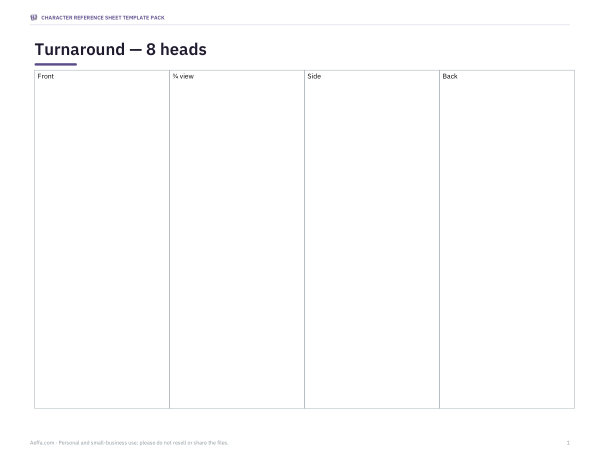
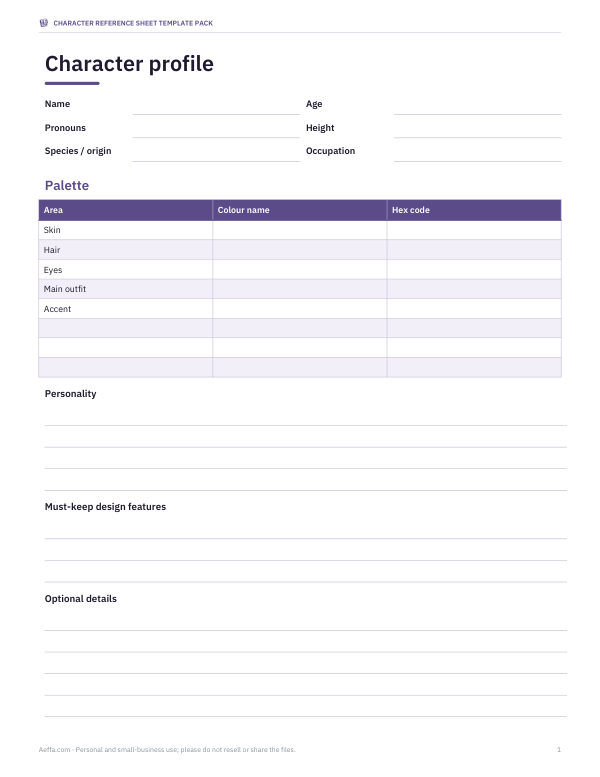
3 blank layout pages (four-view turnaround, 12 expression boxes, 6 outfit/prop boxes) and a character profile page. Two free PDFs; the optional $5 ZIP adds 2 editable Word files and README, 5 files total. No layered PSD or bundled SVG; the free online builder separately generates an SVG with proportion guides.
- Reference sheet layouts (PDF, DOCX)
- Character profile page (PDF, DOCX)
Formats: PDF, DOCX. Instant download after payment (link valid 72 hours, up to 5 downloads). AI-assisted: the templates were drafted with AI help and reviewed and laid out before publishing.
$5.00 USD, one-time
- Instant download
- 7-day refund
- Secure checkout by Stripe
7-day money-back guarantee. Full refund within 7 days of purchase, even after you download.
Full refund within 7 days — see the refund policy and license.
Free printables
Single sheets you can print right now, no sign-up. The full pack adds every sheet in one download plus the editable files.
What a character reference sheet is
A character reference sheet — often called a ref sheet or model sheet — shows one character consistently from several angles, with the details another artist needs to draw them the same way every time. Animation studios have used model sheets for decades so that dozens of artists could keep a character on model. Today illustrators, comic artists, game developers, tabletop players and people commissioning art of their original characters use ref sheets to communicate a design clearly.
What the template includes
- Turnaround — front, side and back views (or up to five angles) standing on the same baseline, with vertical centre lines.
- Proportion guide — horizontal lines dividing the height into head units, so every view has the same height, shoulder line and waist line.
- Expression boxes — squares for facial expressions such as neutral, happy, angry, surprised, sad and thinking.
- Palette swatches — squares to colour in, each with a line to write the hex code or paint name.
- Notes area — for accessories, markings, clothing details, height and personality notes.
How to use it
- Choose the number of views. Three views — front, side and back — cover most designs; add a three-quarter view for faces and hairstyles that change a lot with angle.
- Pick a proportion. Realistic adults are around 7 to 7.5 heads tall, idealised heroic figures 8, teenagers and stylised characters around 6, children and cartoon characters 3 to 4, and chibi characters about 2.
- Print it, save the print output as PDF, or download SVG for an application that supports that format. Procreate does not import SVG directly; its documented PDF import places pages on separate layers.
- Draw the front view first, then carry key heights across using the guide lines: top of head, chin, shoulders, chest, waist, hips, knees, feet.
- Fill in the palette and notes last, once the design is final.
Proportion guide explained
Measuring a figure in “heads” is a centuries-old drawing convention: the height of the head from crown to chin is used as the unit for the whole body. On an 8-head figure, for example, the chin sits at 1, the nipples near 2, the navel near 3, the crotch at 4, the knees near 6 and the feet at 8. Real people vary, and styles exaggerate freely, but using a consistent unit across views is what keeps a turnaround believable. The template labels each unit so you can see where features should line up across every angle.
| Style | Heads tall | Typical use |
|---|---|---|
| Chibi | 2–3 | Stickers, emotes, comedy |
| Cartoon / child | 3–4 | Children's books, mascots |
| Stylised teen | 5–6 | Anime, webcomics, games |
| Realistic adult | 7–7.5 | Illustration, concept art |
| Heroic / fashion | 8–9 | Superhero comics, fashion sketches |
Worked example
An illustrator designing a game character chooses four views, 6 heads tall, six expression boxes and eight swatches on a landscape page. The template draws seven horizontal lines dividing the turnaround area into six equal head units, four evenly spaced columns labelled Front, ¾ view, Side and Back, a two-column block of expression boxes and a row of swatches on the right, and a notes box beneath. She sketches the front view, extends the eye line and belt line across all four columns, and the other views fall into place at matching heights.
Tips for a clear ref sheet
- Draw the views at the same scale and on the same ground line.
- Keep the pose neutral — an A-pose or relaxed T-pose — so costume details are not hidden.
- Show both sides if the design is asymmetric: a scar, a badge or a different sleeve.
- Use flat colours on the main turnaround; save shading for a separate illustration.
- Label anything that could be misunderstood: materials, what is attached, what moves.
- Include height or scale next to another character or an object if size matters.
Using ref sheets for commissions
If you commission art of your own character, a clear reference sheet saves time and money: artists can quote accurately, and you get fewer revisions. Include the character's name, pronouns if relevant, the key features that must not change, colour codes, and any details that are optional. Many artists also appreciate a note on personality and typical expressions. Keep the file at a good resolution and avoid busy backgrounds so the design reads clearly.
Digital workflow
Download the SVG and it stays sharp at any size. Import into an application that supports SVG, or save a PDF from the print dialog for apps that support PDF. Layer and blend-mode controls depend on the application. For a clean final sheet, hide the proportion lines before exporting, or keep them faint as a professional touch that shows the construction.
Frequently asked questions
What views should a reference sheet have?
At minimum front and back; front, side and back is the standard turnaround, and a three-quarter view helps with faces and hair.
How many heads tall should my character be?
Around 7–7.5 for realistic adults, 5–6 for stylised teens, 3–4 for cartoon characters and about 2 for chibi.
Can I use the template in Procreate or Clip Studio?
Check your application’s supported formats. Procreate does not import SVG directly; save the print output as PDF for its documented PDF import. Other applications may handle SVG differently.
Is the template free for commercial work?
Yes, use the blank template for any of your own artwork, including commissions.
Does it include a text profile section?
It has a notes area. For a full written character profile, use a character profile sheet alongside it.
What size should a digital ref sheet be?
A common choice is around 3,000–4,000 pixels on the long side, so details stay readable when artists zoom in.
Format compatibility
Procreate’s official import guide excludes SVG. Its PDF import documentation describes one layer per PDF page. Checked 23 October 2026. The paid Word files contain editable text and drawing boxes, not layered illustration files.
3 blank layout pages (four-view turnaround, 12 expression boxes, 6 outfit/prop boxes) and a character profile page. Two free PDFs; the optional $5 ZIP adds 2 editable Word files and README, 5 files total. No layered PSD or bundled SVG; the free online builder separately generates an SVG with proportion guides.